Overview
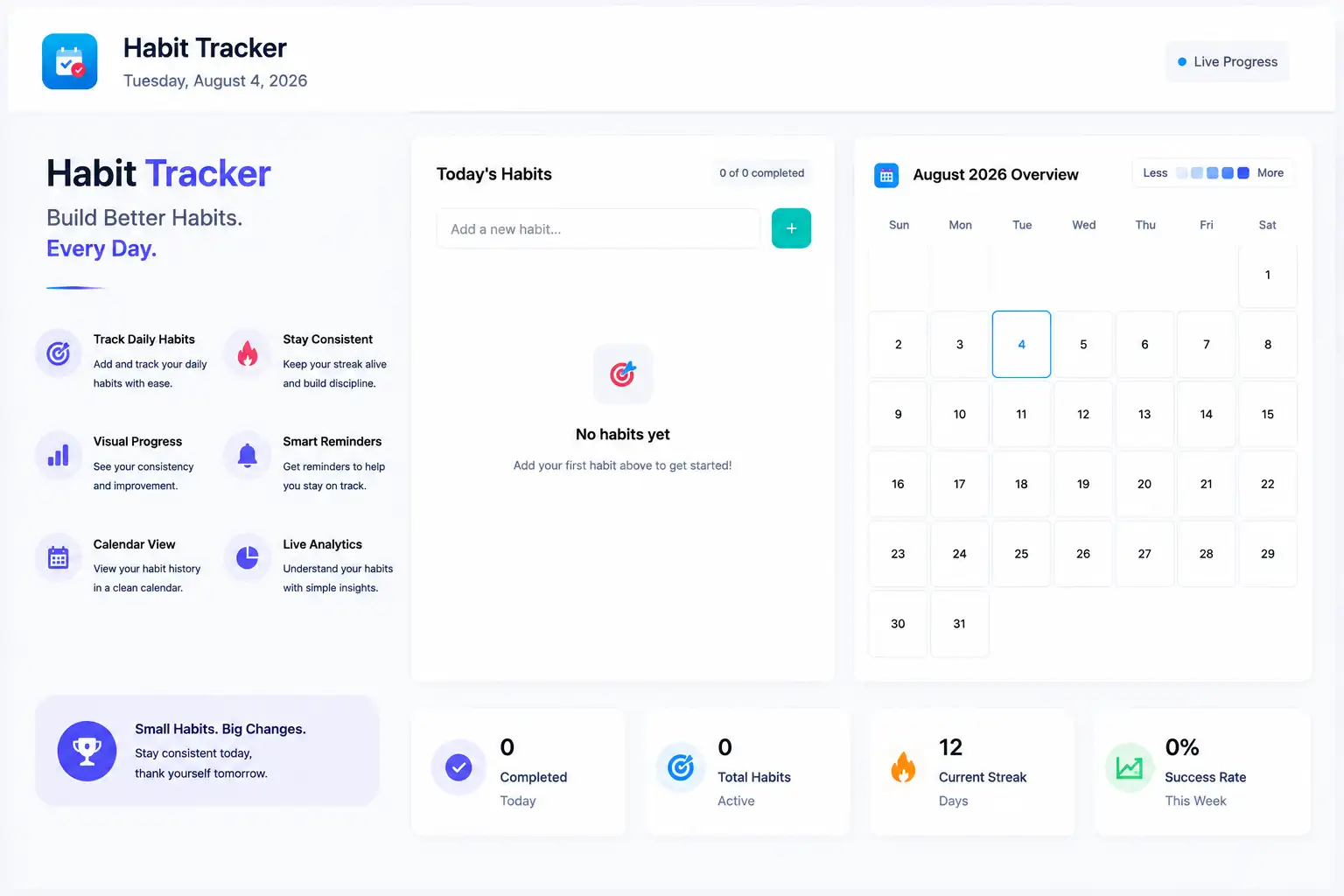
This Habit Tracker helps you build lasting routines by letting you add custom habits, mark daily completions, and visualize your progress—no backend required. Crafted in pure HTML5, CSS3, and vanilla JavaScript, it runs entirely in the browser and stores all data locally for instant access.
✨ Key Features
- Custom Habits: Add, edit, and delete any habit on the fly.
- Calendar Heatmap: Color-coded view of your daily completion rates.
- Real-Time Analytics: Live streak counters and progress bars update instantly.
- LocalStorage Persistence: All data auto-saves in your browser—no signup needed.
- Responsive Design: Seamless experience on desktop and mobile.
⚙️ How to Install
- Download or clone the project folder.
- Ensure
index.html, styles.css, and script.js are in the same directory. - Open
index.html in any modern browser to start tracking.
How to Use
- 1. Enter a habit name in the “Add Habit” field and click “+”.
- 2. Click a day’s checkbox to mark it complete—heatmap and stats update live.
- 3. Edit or delete habits via the gear icon next to each entry.
️ Support
- For questions or bug reports, please open a ticket on the CodeCanyon support page.
- Regular updates and new features will be added based on user feedback.
Overview
This Habit Tracker is a front-end web application built with pure HTML5, CSS3, and vanilla JavaScript—no backend required. Users can define custom habits, mark daily completions, and visualize their progress through an interactive calendar heatmap and real-time analytics.
Features
- Custom Habits: Add, edit, and delete any habit on the fly.
- Calendar Heatmap: Color-coded calendar showing daily completion rates.
- Real-Time Analytics: Live streak counters, progress bars, and quick stats.
- LocalStorage Persistence: All data auto-saves in the browser—no signup needed.
- Responsive Design: Optimized for desktop, tablet, and mobile devices.
Project Structure
HabitTracker/
├── index.html
├── styles.css
└── script.js
Installation & Setup
- Download or clone the project folder.
- Ensure
index.html, styles.css, and script.js are in the same directory. - Open
index.html in any modern browser to launch the app.
Usage
Adding & Managing Habits
- Enter a habit name in the “Add Habit” field and click the “+” button.
- Edit or delete habits via the gear icon next to each entry.
Tracking Progress
- Click a date cell to mark a habit as completed for that day.
- Calendar cells color-shade based on completion percentage.
- View live streak counters and progress bars to gauge consistency.
Customization
- Styles: Modify
styles.css to adjust colors, fonts, or layout. - Logic: Edit
script.js to change heatmap thresholds or add new analytics. - Assets: Replace any icons or logos in
index.html for branding.
Support
- For bug reports or feature requests, please open a ticket on the CodeCanyon support page.
- We regularly update the tool based on user feedback and best practices.